Plus
For small teams up to 10 where one person shares signatures.
$9.99
per month, billed monthly
Choose Plus- Up to 10 saved signatures
- Custom colors, logo & banners
- Click analytics & image hosting
- Digital Business Card with QR

Stop paying every month for every employee just to keep email signatures on-brand. Design one master template, share a single personalization link, and pay one flat rate as your team grows.
Slide to your headcount to compare MySigMail’s flat rate against published per-user signature platforms.
Flat rate with personalization links, click analytics, image hosting, and Digital Business Cards included. Zero per-seat charges as you hire.
Per-seat tools scale with every hire; MySigMail stays flat.
Includes centralized Workspace/M365 push; analytics requires Grow.
Per-signature pricing billed annually; centralized deployment included.
Centralized server-side platform; analytics requires Pro.
Closest WiseStamp tier with click analytics included.
Competitor totals use published annual-billed per-user rates checked Aug 14, 2026. Competitor tools include centralized Google Workspace or Microsoft 365 deployment; MySigMail uses client-side copy-paste via personalization links.
Per-seat tools ask every employee to accept an invite, remember a password, and learn another dashboard just to copy a signature once. MySigMail replaces that flow with one brand-locked link.
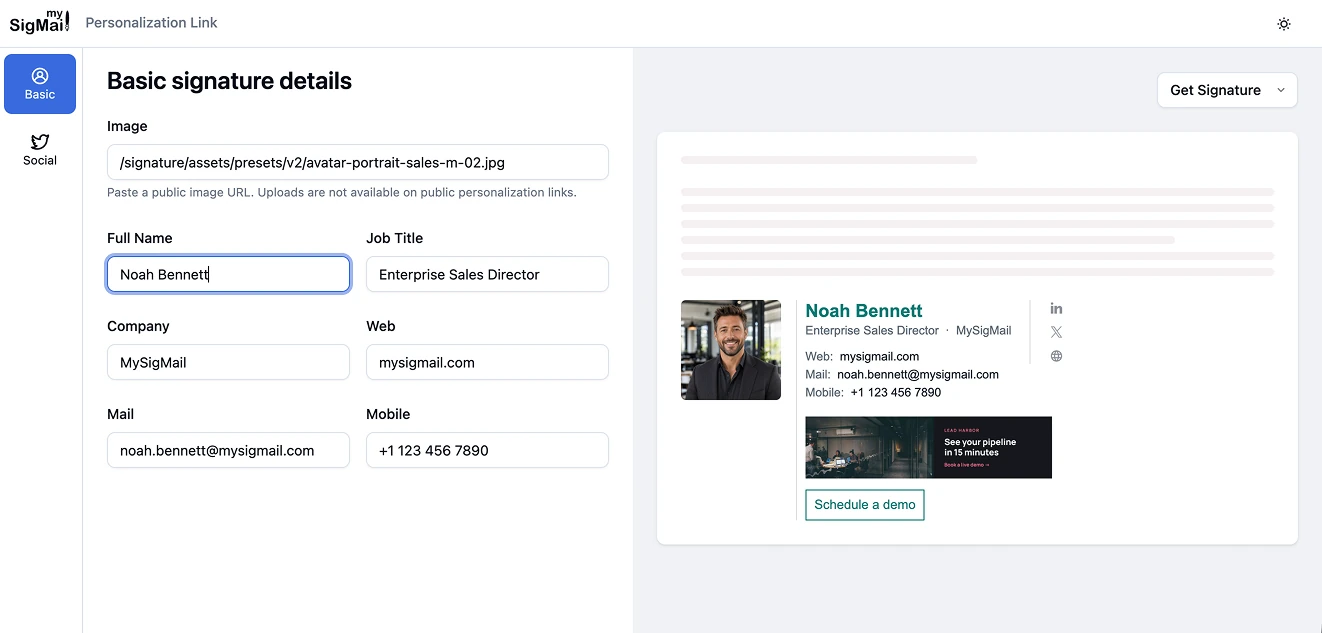
Each teammate opens one shared link without logging in, types their own details on the left, watches the branded signature update live, and clicks Get Signature to copy.
Colors, fonts, logo, layout, and campaign banners stay under your control and can’t be altered by teammates.
Teammates fill in only what you allow — name, role, direct phone, email, social links, or a public photo URL.
Keep the same URL in your onboarding checklist so day-one signatures match the rest of the company.
Pick from 100+ tested templates, set your brand colors, upload your logo, and add a promo banner or CTA button.
Choose which personal fields teammates can edit and drop the single URL into Slack, email, or your onboarding doc.
No logins, no password resets, and no IT tickets. Everyone fills in their details and pastes into Gmail, Outlook, or Apple Mail.
MySigMail skips heavy mail-server integrations to stay fast, simple, and flat-rate. Here’s when it fits — and when an enterprise platform makes more sense.
Start on the Free plan to test templates and layouts. Upgrade only when you’re ready to share personalization links or host client assets.
For small teams up to 10 where one person shares signatures.
$9.99
per month, billed monthly
Choose PlusBest for growing teams of 10–50 people.
$24.99
per month, billed monthly
Choose ProFor companies over 50 people that want one flat bill.
$99.99
per month, billed monthly
Choose Unlimited“I have been supplying signatures for clients for ten years or more, and its always been a nightmare until I found MySigMail and things change straight away”
“I've spent hours trying various email signature generators. All of them were either broken, too bland, or behind an over-priced paywall. Coming across MySigMail was a godsend!”
“What I liked the most is that they offer many alternatives for signing, and compared to others, it is very economical. I recommend it and hope they grow”
Instead of charging per employee every month, MySigMail charges one flat rate by saved signature tier: Pro ($24.99/mo or $239/yr) covers up to 50 saved signatures with personalization links, and Unlimited ($99.99/mo or $959/yr) removes the limit. You never get billed per user who uses a personalization link.
No. Only the person designing and managing the template needs an account. Everyone else opens your personalization link, fills in the fields you allowed, and copies their finished signature.
No. Personalization links only expose the fields you mark as editable (such as name, title, phone, email, social links, or a public image URL). Brand colors, layout, logo, and campaign banners stay locked.
No — MySigMail is client-side by design. Each teammate copies their personalized signature and pastes it into Gmail, Outlook, or Apple Mail in about two minutes. If centralized server-side deployment is a strict requirement, tools like Exclaimer or WiseStamp handle that model.
Recreating your team’s master layout in MySigMail takes a few minutes using our templates and layout blocks — or for teams of 5+ and agencies, email a screenshot (preferred) or masked HTML of your existing signature to contact@mysigmail.com and we’ll rebuild 1 master template for free within 1 business day. Once the master template is ready, send one personalization link in Slack and your team can swap signatures the same day.
Personalization links do not charge per employee, and if you need more than 50 saved signature templates in your dashboard, you can upgrade anytime to the Unlimited plan ($99.99/mo or $959/yr flat).
Build your master template on the Free plan first. Upgrade to Pro ($24.99/mo flat) when you’re ready to share your personalization link.