Package signatures inside every brand book
Stop sending fragile HTML snippets or Word docs clients break on day one. Include one branded personalization link alongside logos, fonts, and color guidelines.

Deliver ready-to-use email signatures as part of every brand book. Build one locked template per client, send a single personalization link to their team, and never pay per employee seat.
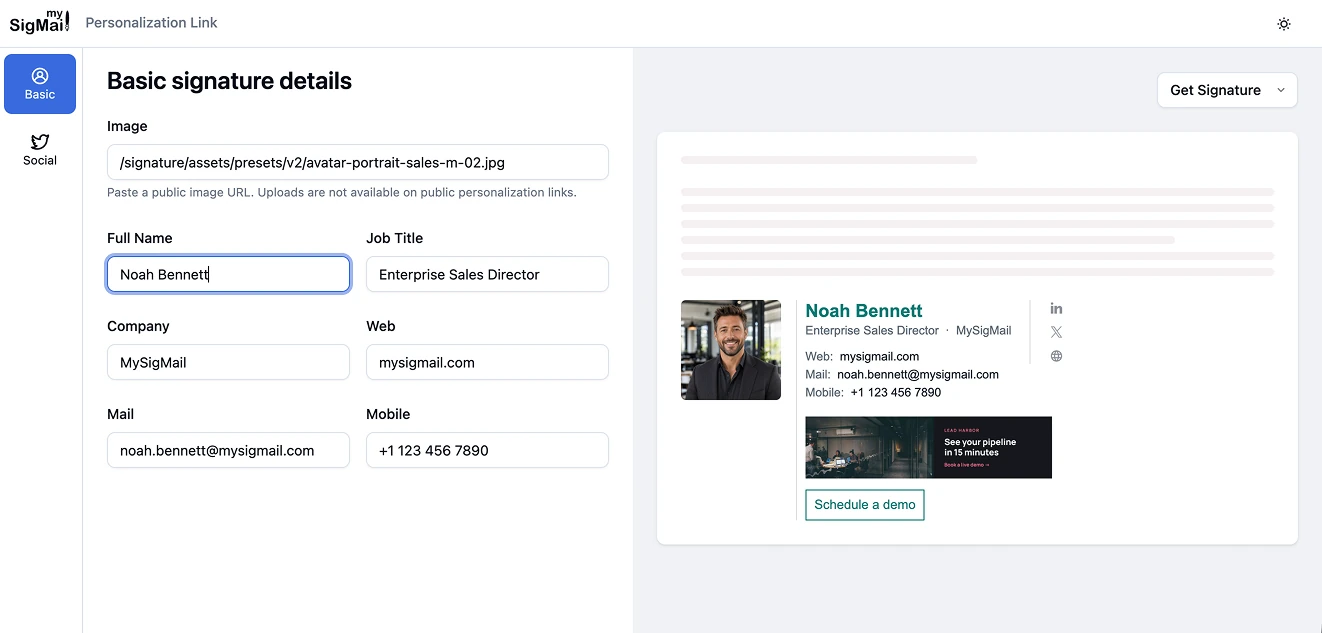
What your client’s team sees when they open your personalization link: only the fields you unlocked are editable. Colors, typography, layout, banner, and CTA stay locked to your brand book.
You spend weeks perfecting a client’s visual identity. Don’t hand over a broken HTML file at the finish line — or push them into per-seat software they won’t pay for.
Stop sending fragile HTML snippets or Word docs clients break on day one. Include one branded personalization link alongside logos, fonts, and color guidelines.
Keep typography, palette, spacing, company logo, and CTA banners locked. Client employees only fill in their name, title, contact details, social links, or a public headshot URL.
No per-employee billing when a client hires ten new people. One Pro account covers up to 50 saved client templates at a flat monthly rate — Unlimited removes the cap.
One link inside your handoff doc replaces dozens of manual signature edits and follow-up support emails.
Start from 100+ layouts or rearrange blocks on Pro. Apply the client’s palette, logo, social icons, disclaimer, and optional campaign banner.
Choose which fields each client teammate can change. Drop the single URL right into your Notion brand guidelines, Figma handoff, or delivery email.
No client accounts, passwords, or IT admin tickets. Each person enters their details, sees a live preview, and copies ready HTML into Gmail, Outlook, or Apple Mail.
Built for client-side installation across Gmail, Outlook, and Apple Mail — no client IT admin access or mail-server connectors required.
Store up to 50 client signatures on Pro or unlimited templates on Unlimited inside one dashboard.
Logos and campaign banners are hosted reliably so signatures never arrive as broken attachments.
Bundle a mobile contact page with QR code and one-tap vCard download alongside every signature.
Track link and banner clicks on Plus and above so clients see measurable engagement from email updates.
Rearrange template blocks on Pro and add banners, CTA buttons, handwritten sign-offs, or disclaimers.
Every paid tier removes the MySigMail watermark so the deliverable looks 100% bespoke to your client.
Every preset renders cleanly across Gmail, Outlook, and Apple Mail. Click any design to open it directly in the editor.
Start on the Free plan to test templates and layouts. Upgrade only when you’re ready to share personalization links or host client assets.
For solo designers handling a few client signatures.
$9.99
per month, billed monthly
Choose PlusBest for studios delivering signatures with brand books.
$24.99
per month, billed monthly
Choose ProFor high-volume agencies managing dozens of client brands.
$99.99
per month, billed monthly
Choose Unlimited“I love how quickly I can build out signatures for myself and my clients too. The clean and simple interface lets me quickly get my work done”
“I have been supplying signatures for clients for ten years or more, and its always been a nightmare until I found MySigMail and things change straight away”
“I've spent hours trying various email signature generators. All of them were either broken, too bland, or behind an over-priced paywall. Coming across MySigMail was a godsend!”
No. On Pro and Unlimited, you share one personalization link per client template. Any employee on the client’s team can open the link, enter the fields you enabled, and copy their finished signature without signing up.
Design the client’s master signature inside your account, enable personalization on the individual fields (name, title, phone, email, social links, and optional public photo URL), and paste the personalization link into your Notion, PDF, or Figma brand guidelines.
No. MySigMail is billed flat-rate by the number of saved signature templates in your account (up to 50 on Pro, unlimited on Unlimited) — not per employee who uses a personalization link.
Paid plans include cloud image hosting while your subscription is active. If a subscription is canceled, cloud-hosted images stop serving at the end of the billing cycle — or you can have clients keep their own Pro plan for ongoing retainers and banner updates.
Copied signatures work across Gmail, Outlook (web and desktop), Apple Mail, Office 365, and Spark. Installation is client-side (copy and paste), so your agency never needs Google Workspace or Microsoft 365 admin credentials.
Yes. Start on the Free plan to browse all templates and test the editor with no credit card and no time limit. Upgrade to Pro ($24.99/mo flat) when you are ready to save multiple client templates and share personalization links.
Start on the Free plan to build and test your first client template. Upgrade to Pro when you’re ready to share personalization links.