
How to Create a Digital Business Card With a QR Code
August 14, 2026
A digital business card is a mobile-friendly contact page that you can share through a link or QR code. A useful card should let someone identify you, choose a contact action, and save the details without manually retyping them.
The practical setup is: create one hosted card, add only the contact and brand details a recipient needs, generate a QR code that opens the card, provide a downloadable vCard, and test the complete scan-to-save workflow on another device. MySigMail can build that card from an existing email signature, so the same profile supports both email and in-person sharing.
Digital Business Card, vCard, and QR Code: What Is the Difference?
These terms describe different parts of the workflow:
| Element | What it is | Best use |
|---|---|---|
| Digital business card | A hosted, mobile-friendly contact page | Let people view details and choose an action |
vCard (.vcf) | A structured contact file | Transfer selected fields into a contacts application |
| QR code | A scannable representation of data, commonly a URL | Move someone from a physical interaction to the card page |
| Email signature | Contact and brand information attached to an email | Identify the sender and provide actions inside the inbox |
A QR code alone is not necessarily a digital business card. It may contain a URL, raw contact data, or some other value. Likewise, a hosted card does not automatically guarantee that its contact file will import identically into every contacts application.
For a card that may change over time, pointing the QR code to a hosted page is usually easier to maintain than encoding every detail directly in a static QR image. You can update the page while continuing to share its URL. The tradeoff is that the hosted page must remain accessible.
What to Include on a Digital Business Card
Start with the information someone needs to recognize you and take the next step:
- your photo, name, job title, and company;
- one primary phone number and email address;
- your company website or the most relevant destination page;
- a logo or restrained brand color when it helps recognition;
- only the social profiles that support the relationship;
- a clear Save contact action;
- a simple way to copy or reshare the card link.
Do not turn the card into a complete biography or link directory. Every extra field competes with Call, Email, Website, and Save contact. If a link does not help the person who just met you, leave it out.
Example: A Digital Business Card Built From an Email Signature
MySigMail builds its digital card from the fields in an existing email signature. Depending on the information you add and choose to show, the card can include a QR code, direct contact actions, additional fields, social links, a downloadable .vcf file, and a copy-link action.
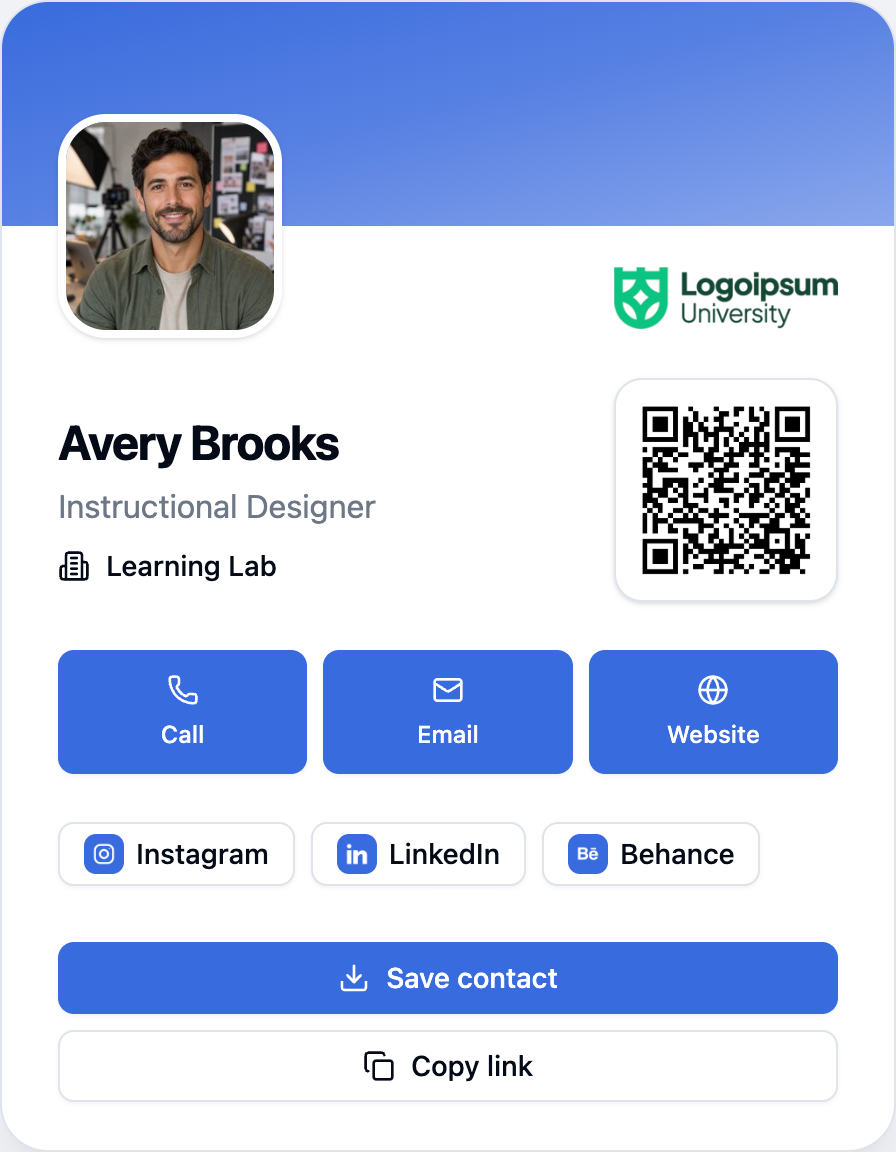
Using the email signature as the source avoids maintaining an unrelated second profile. When a role, phone number, link, photo, or brand detail changes, update the signature that supplies the card and review the published result.
How to Create a Digital Business Card With MySigMail
- Open the signature you want to share.
- Add or review the contact details, photo, logo, and social links in the editor.
- Select the Business card tab above the preview.
- Use the visibility control to choose which signature fields appear on the public card.
- Open Share in the editor header.
- Enable the public link if the signature has not been published yet.
- Copy the separate Business card link and share it where you need it.
The signature page and business card use separate URLs. Share the compact card when the goal is contact exchange while keeping the full signature preview available for other workflows.
Three Practical Ways to Share It
Show the QR code in person
Open the card on your phone at a meeting, event, or client visit. The other person can scan the QR code to open the same public card in their browser.
The QR code points to the card URL; it does not embed all contact details directly inside the QR image. That means the published card needs to remain accessible for the link to open.
Send the card link
Use Copy link when a compact contact page is more useful than pasting a full signature. For example, you can send it in a direct message, an event chat, or a follow-up note.
Let someone save the contact
The Save contact action downloads a vCard 3.0 .vcf file generated from the visible, valid card fields. The current implementation can include the formatted name, job title, company, email, phone, website, photo, logo, and supported social profile URLs when those values are available and safe to use.
The vCard format is designed for representing and exchanging contact information. RFC 2426 defines vCard 3.0 and its standard contact properties. The receiving device or contacts application still decides how to import and display the downloaded file.
How to Choose a Digital Business Card Generator
Evaluate the complete recipient workflow, not just the card template. A practical generator should answer these questions:
| Question | Why it matters |
|---|---|
| Can the card be opened in a normal mobile browser? | Recipients should not depend on a proprietary editor to view it |
| Does the QR code open a stable card URL? | You need to know what will happen after the scan |
| Can a recipient save a structured contact file? | A pretty page alone still leaves manual data entry |
| Can you hide individual fields? | A public card may need less information than your internal profile |
| Can you update the source profile? | Titles, numbers, links, and branding change |
| Are the card and outbound actions measurable? | Interaction counts can help evaluate whether the card is being used |
| What happens after a downgrade or cancellation? | A shared link is useful only while its hosting terms remain acceptable |
Also check whether the tool creates the card from data you already maintain. If your email signature and digital card are separate records, every change becomes a synchronization task.
Choose What the Public Card Shows
A published business card is a public contact surface. Anyone with its link can view the fields you leave visible, so review the card before sharing it broadly.
Use Business Card Visibility to hide a field or social link that belongs in an email signature but should not appear on the public card. This is especially useful for direct phone numbers, secondary profiles, internal details, or signature-only custom fields.
Hiding a field from the Business Card view does not require deleting it from the underlying email signature. MySigMail stores the card visibility choices separately and uses them when it builds the public page and contact file.
Track Business Card Engagement
MySigMail records three business-card-specific analytics signals:
| Metric | What it represents |
|---|---|
| Business card views | The published card page was viewed |
| Business card saves | The visitor used Save contact |
| Business card clicks | The visitor used an outbound contact or profile action |
Treat these as interaction counts, not proof that a relationship, reply, or sale resulted. They can tell you whether people open and use the card, while the business outcome still needs to be measured in the system where that outcome happens.
Availability
Digital Business Cards are included in the Plus, Pro, and Unlimited plans. They are not included in the Free or Basic plans. A signature must be published before its business card link can be shared.
If you are on a plan without the feature, you can still prepare the signature fields and preview how the card is assembled before deciding whether to upgrade.
Before You Share Your Card
Run this short check:
- Confirm that the name, title, company, and photo are current.
- Test the Call, Email, and Website actions.
- Open every social link you plan to show.
- Hide any field that should not be public.
- Scan the QR code with a second device.
- Download the
.vcffile and inspect the imported contact before using the card at an event. - Open the public link in a signed-out or private browser window to see what a recipient can access.
The last two steps matter because a correct MySigMail preview cannot guarantee how every camera, browser, or contacts application will handle the next part of the workflow.
Digital Business Card FAQ
Do I need a QR code for a digital business card?
No. A digital business card can be shared as a normal URL. A QR code is useful when you need to move someone from an in-person interaction, printed item, presentation, or another screen to that URL without asking them to type it.
Should the QR code contain the contact details or a link?
Both patterns exist. A QR code containing contact data can work without a hosted profile, but the encoded details are fixed when the image is created. A QR code pointing to a hosted card keeps the visual handoff simple and lets the page behind the URL be updated. It depends on continued access to that hosted page.
What file should the Save contact button download?
The common format is a vCard file with the .vcf extension. Validate the actual exported fields and test the file in the contacts applications your audience uses instead of assuming that every optional property will appear the same way.
Is a digital business card the same as an email signature?
No. An email signature appears inside an email and identifies the sender in that message. A digital business card is a separate shareable contact page. They can use the same underlying profile, which reduces duplicate maintenance.
Use One Profile for Email and Real-World Sharing
The useful setup is not another place to type your contact details. It is one maintained profile connecting two moments: the professional identity people see in your email and the contact page you share when the conversation moves beyond the inbox.
Open your signature in MySigMail, switch to Business card, review the visible fields, and publish the link when it is ready to share.




Recent Posts
Gmail Signature Too Long? How to Fix the Error
September 17, 2026
Why We Open-Sourced MySigMail Card, an HTML Email Builder
August 26, 2026
How to Create a Digital Business Card With a QR Code
August 14, 2026
How to Make a Phone Number Clickable in an Email Signature
August 7, 2026
Gmail Aliases: Different Signatures for New Emails and Replies
July 24, 2026