
30 Ways to Enhance Your Email Signature and Boost Your Professional Image
May 29, 2026
You send 30 to 40 emails a day. Each one ends with the same few lines you probably set up once and forgot. That footer is the most-seen, least-used piece of real estate you own — and it goes to people who already know you, which makes it the warmest audience you'll ever reach.
So what if the bottom of every email did more than spell your name? This guide breaks down 30 ways to put that space to work, grouped by what you're actually trying to achieve: building your brand, driving marketing results, earning trust, sparking engagement, and supporting day-to-day operations. For each group you'll see why it matters and how to set it up.
Foundation: get the basics right first
Before your signature becomes a marketing channel, the fundamentals have to be solid. A cluttered or inconsistent signature undermines everything else.
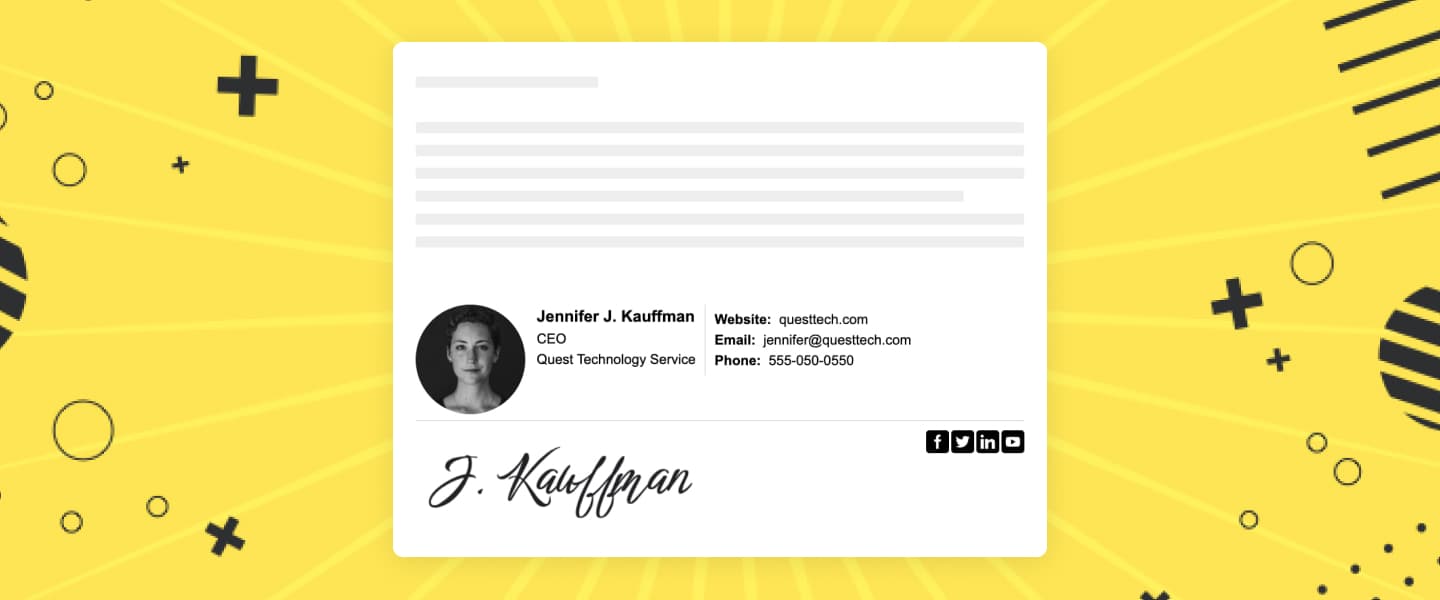
- Branding. Lead with your business name, logo, and website. The logo is the highest-recall element in a signature — keep it under 100px tall, link it to your homepage, and host the image instead of attaching it so it doesn't trip spam filters.
- Contact information. List only the channels you want people to use — phone, email, and a physical address if trust matters in your field. Every extra line dilutes the ones that count.
- Professional title. Your name and role tell the reader who they're dealing with and whether you can help. Keep it to one line:
Jane Doe — Head of Sales. - A legible, simple design. Two or three colors, one or two fonts, clear hierarchy. When a signature looks like a flyer, people stop reading it. Simplicity is what makes the other 26 ideas land.
- Mobile-friendly layout. More than half of email gets opened on a phone. Check that your signature stacks cleanly on a narrow screen and that links and icons aren't crammed together.
Marketing and lead generation: make the footer work
Here's where the signature stops being a name card and starts producing results. Pick one element as your primary call to action and swap it as campaigns change.
- A single clear call to action. One action per signature — "Book a demo," "Read the case study," "Start your free trial." One focused CTA beats three competing ones every time.
- Promotions and events. Add a small banner for a webinar, launch, or seasonal offer. It rides along on email you're already sending, so the extra cost is zero.
- Marketing collateral. Link to the brochure, case study, or whitepaper that supports the conversation you're already having.
- Newsletter or blog subscription. A simple "Subscribe" link turns everyday replies into list growth.
- New products or services. Surface a new offering to the audience that already trusts you — your existing contacts are your warmest channel.
- Cross-promotion. Point to a complementary product or partner offer your reader is likely to care about.
- Deals and special offers. Highlight a time-limited discount, and pair it with a deadline so it drives action instead of sitting there.
- Referral program. Invite recipients to refer a colleague, with a link to your referral page. Word of mouth scales when you make it one click.
- Job openings. A "We're hiring" link reaches passive candidates who already like working with you.
Trust and credibility: earn the click
People act on emails from senders they trust. These elements borrow credibility from third parties and make you look established.
- Customer testimonials. A one-line quote from a happy client — "Cut our onboarding time in half, Acme Corp" — is social proof that travels with every message.
- Awards and certifications. Industry badges show that someone independent has vetted you. Keep them small and current.
- Legal disclaimer. In finance, healthcare, or law, a short compliance line isn't optional — but keep it minimal so it doesn't bury your message.
- Company value proposition. One sentence on what sets you apart, for the reader who doesn't know your brand yet.
- Industry news or updates. Linking to a relevant report or your own take positions you as a source worth following, not another vendor.
Engagement: invite a response
The best signatures don't just broadcast. They open a two-way door.
- Surveys and feedback. An NPS link or "How are we doing?" prompt gathers insight on every email, without extra effort.
- Video introduction. A thumbnail linking to a 30-second intro adds a face and lifts click-through over plain text.
- Personalized greeting. A short, audience-tailored line — "Thanks for being a customer since 2021" — makes the signature feel written, not generated.
- Availability schedule. Sharing your working hours and time zone cuts back-and-forth and sets reply expectations.
- Schedule a demo or call. Embed a booking link (Calendly, Cal.com) so an interested reader grabs time without sending a single reply.
Operations: scale it across your team
Signatures aren't only personal — they're a company asset that should look and behave the same for everyone.
- Standardized employee signatures. When every team member uses the same template, every email reinforces one brand. Inconsistency looks amateurish and chips away at trust.
- Support and service hours. Tell customers when and how to reach help, and cut the "are you there?" emails.
- Customer loyalty program. Promote your rewards scheme to the customers most likely to use it.
- Multilingual support. If you serve multiple regions, naming the languages you support signals reach and accessibility.
Brand values: show what you stand for
Buyers increasingly pick companies whose values match their own. The signature is a low-key place to make those values visible.
- Sustainability efforts. A short note or badge about eco-friendly practices resonates with values-driven customers — keep it honest and specific.
- Social responsibility and partnerships. Highlight charitable work, community projects, or notable partnerships to show the network and causes behind your brand.
How to set this up without touching code
You don't need a designer or a developer for any of this. In MySigMail you drop in a logo, add social icons, attach a banner for a promotion, and insert tracked CTA buttons — then export clean HTML that works in Gmail, Outlook, and Apple Mail. Most people build a finished signature in under 60 seconds, on the free plan, with no card and no deadline.
Running a team? Build one template and reuse it so every employee stays on-brand. And if you want to know which CTAs people actually click, see our guide on tracking link clicks in email signatures.
Common mistakes to avoid
- Doing too much at once. Five of these done well beat fifteen crammed together. Rotate elements instead of stacking them.
- Images that break. Host images on a server and add
alttext. Never send the logo as an attachment. - Stale content. A signature pushing last quarter's webinar makes you look asleep at the wheel. Review it whenever a campaign ends.
- No way to measure. If you add a CTA, add a UTM tag or use built-in analytics so you know whether it works.
FAQ
Conclusion
Your email signature is a marketing channel you already pay for — every email is a free impression to an audience that already knows you. Start with a clean, consistent foundation, add one purposeful call to action, then layer in trust and engagement elements as they fit your goals. Keep it current, measure what you add, and that small block at the bottom of every message will do real work for your brand.



Recent Posts
Why We Open-Sourced MySigMail Card, an HTML Email Builder
August 26, 2026
How to Create a Digital Business Card With a QR Code
August 14, 2026
How to Make a Phone Number Clickable in an Email Signature
August 7, 2026
Gmail Aliases: Different Signatures for New Emails and Replies
July 24, 2026
30 Ways to Enhance Your Email Signature and Boost Your Professional Image
May 29, 2026